
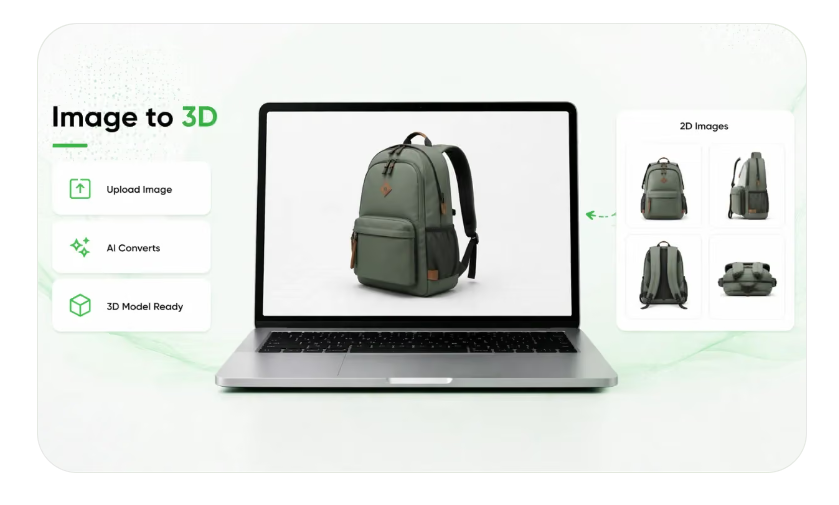
Digital wholesale catalogs have to communicate more than product names, prices, and availability. Buyers often need to understand exactly what they are ordering before committing to large quantities, arranging distribution, or adding products to their own inventories. A traditional catalog can provide photographs and written specifications, but these materials may not always show enough detail to answer practical questions about a product’s construction, dimensions, or appearance.
Interactive product models offer another way to present this information. They allow wholesale buyers to examine digital representations from different angles and explore visible features without relying entirely on a collection of static images. However, their usefulness depends on how accurately they represent the physical products. A model that looks convincing but contains incorrect proportions, materials, or components can create confusion rather than improve product understanding.
For businesses building digital wholesale catalogs, accuracy must therefore be treated as an essential part of the content process. Every model should be checked against reliable product information before it becomes part of a buyer-facing catalog.
Wholesale Buyers Need More Than a General Product View
Wholesale purchasing decisions often involve several people and multiple stages of evaluation. A purchasing manager may compare product specifications, a distributor may examine packaging requirements, and a retailer may need to confirm whether an item matches the expectations of its customers. Each person approaches the catalog with different questions, but all depend on receiving consistent information.
A single product photograph may communicate the overall appearance of an item, yet it can hide important characteristics. The image might not reveal how deep a container is, whether a component is removable, or how a product is assembled. Even several photographs can leave gaps when they show different lighting conditions, angles, or product versions.
An interactive model can make examination more flexible. Buyers may rotate an item, inspect its sides, and view details that are difficult to understand from a front-facing image. This can be especially useful for products with unusual shapes, multiple components, or design features that influence purchasing decisions.
Nevertheless, a digital model should not be treated as an independent source of truth. Its purpose is to communicate the physical product, not to replace verified specifications. If the underlying representation is inaccurate, interactive viewing can make the incorrect information appear more convincing.
Turning Existing Product Photography Into Digital Representations
Wholesale suppliers frequently maintain extensive collections of product photography. These images may have been created for printed catalogs, online listings, packaging materials, or distributor presentations. Reusing them as starting points for digital models can help businesses expand their visual resources without arranging a completely new photography process for every item.
A 2d to ar converter can form part of a workflow in which existing product visuals are used to create interactive digital representations. This approach can be useful when a company manages hundreds or thousands of catalog entries and needs a more efficient way to develop visual content. However, converting an image into a model does not automatically establish that the resulting object has accurate dimensions or construction.
The quality of the source material has a significant influence on the result. A clear photograph showing the complete product provides more useful information than an image with cropped edges, heavy shadows, or objects covering important features. Multiple views can provide additional evidence about areas that a single photograph cannot reveal.
Businesses should also consider whether their reference images represent the latest product version. A photograph from an earlier production run may show an outdated label, a previous handle design, or a component that has since been changed. If the model is generated from that image, the digital result may reproduce the same outdated characteristics.
A reliable conversion process should therefore begin with source-image selection. Teams need to identify the correct product variant, confirm that the reference photographs are relevant, and record any features that cannot be established visually. These checks reduce the likelihood of treating an attractive but incomplete model as a verified representation.
Proportions Must Match the Physical Item
Proportions are among the first characteristics buyers notice when examining a product model. An item may have the correct general shape but still appear misleading if its parts are incorrectly sized in relation to one another.
For example, a storage container might have a lid that looks too wide, a base that appears unusually narrow, or walls that seem thicker than those of the physical product. A furniture model could show an incorrect relationship between its seat, legs, and backrest. These differences can affect how buyers understand the product, even when the overall silhouette remains recognizable.
Proportion checks should consider the entire object as well as its individual sections. Teams can compare the relative height of components, the width of openings, the spacing between structural elements, and the balance between large and small features.
This is particularly important for wholesale catalogs containing products that are available in several sizes. A small variation in the relationship between components may distinguish one model from another. If generated representations make different variants appear almost identical, buyers may struggle to identify the correct item.
A useful review process compares the digital model with approved photographs and documented measurements. The objective is not simply to make the model look visually appealing. It is to ensure that the relationships between its features remain consistent with the physical product.
Dimensions and Scale Require Separate Verification
A product can have convincing proportions while still being displayed at the wrong overall size. This distinction matters because buyers may use interactive models to understand whether an item will fit into a particular environment, package, display, or storage arrangement.
Height, width, and depth should be checked against verified product specifications. These measurements need to describe the actual item rather than an approximate interpretation based on its appearance in a photograph. Perspective can make objects look larger or smaller, and camera angles may conceal their true depth.
Scale also becomes important when products are viewed in relation to surrounding objects. A model of a commercial appliance, for instance, should not create the impression that it is suitable for a compact workspace if its actual dimensions require considerably more room. Similarly, packaging models should communicate their real size when buyers are evaluating shipping, storage, or shelf placement.
Wholesale suppliers should avoid using visual estimation as a substitute for measurement records. Where exact dimensions are available, they should become part of the model validation process. If measurements are unavailable, the model should not be presented as a dimensionally verified representation.
The same standards should apply across product variants. When a catalog includes several capacities, lengths, or sizes, each model needs to reflect the appropriate specifications. Reusing one model with only a different product name can lead to incorrect expectations and ordering mistakes.
Examining 3D Creation and the Quality of Generated Results
Automated model creation can accelerate the development of catalog visuals, but the generated result still requires careful evaluation. An Image to 3D workflow may produce a three-dimensional representation from product photography, yet the output can contain details that were not clearly visible in the original images.
A model might reproduce the front surface reasonably well while inventing or simplifying features on the opposite side. It may also interpret shadows as physical edges or create smooth surfaces where the actual product has separate panels. These problems are not always obvious when the model is viewed from its most attractive angle.
Evaluation should begin by examining the model from multiple directions. Reviewers should rotate it to inspect the front, back, sides, top, and underside where relevant. Areas that were hidden in the source photographs deserve particular attention because the generation process may have filled missing information with assumptions.
The team should then compare the model with reference photographs and product documentation. If the available images do not establish a particular feature, that uncertainty should be recorded rather than silently accepted. Additional photography or input from the product team may be needed before approval.
Automated generation can reduce repetitive production work, but it does not remove the responsibility to verify the final asset. The distinction between creating a model and approving a model should remain clear throughout the catalog workflow.
Materials and Surface Appearance Influence Buyer Expectations
Materials communicate important information about a product. A surface may be made from brushed metal, transparent plastic, natural wood, fabric, ceramic, or another material with distinct visual and physical characteristics. If an interactive model represents these surfaces incorrectly, buyers may develop an inaccurate impression of the item.
A metal product rendered with a plastic-like finish may appear cheaper or lighter than the real object. A fabric product with an overly smooth surface may lose the texture that distinguishes it from other options. Similarly, a transparent component that appears opaque could hide an important feature.
Material evaluation should consider color, reflectivity, transparency, texture, and visible surface variation. These characteristics should be compared with approved product photographs under reasonable viewing conditions. A model does not need to reproduce every microscopic feature, but it should communicate the characteristics that influence product identification and purchasing decisions.
Lighting can also affect how materials appear in an interactive environment. A surface may look brighter, darker, or more reflective depending on the surrounding conditions. Reviewers should therefore distinguish between differences caused by the rendering environment and genuine errors in the model’s material representation.
Where a material has practical importance, written specifications should support the visual review. A photograph may suggest that a component is metallic, but it may not establish the exact material or finish. Verified product information should take priority over visual assumptions.
Small Details and Components Should Not Be Overlooked
Minor features can carry considerable importance in wholesale transactions. Buttons, fasteners, connectors, handles, seams, openings, hinges, labels, and other small components may distinguish one product version from another.
A generated model might omit a small attachment, change the shape of a connector, or simplify a control panel. These changes can make the product appear more generic than it really is. In some industries, they may also affect whether buyers believe an item is compatible with their existing equipment or intended use.
Reviewers should identify which details are essential to product recognition and functionality. Not every decorative mark needs the same level of attention, but components that influence assembly, compatibility, operation, or ordering should be checked carefully.
The number and arrangement of components also matter. A model of a product supplied with several detachable parts should not show an incorrect configuration. If the physical item includes a removable cover, adjustable section, or additional accessory, the digital representation should communicate that arrangement accurately.
Catalog teams can maintain a component checklist for products with complex construction. This makes it easier to verify that important parts are present and correctly positioned. It also creates a consistent standard for reviewing similar products across a large catalog.
Reference Photos Should Form a Reliable Evidence Base
A strong model review depends on the quality of the information used for comparison. Reference photographs should show the product clearly and represent the same version that the business intends to sell.
A useful reference set may include front, rear, side, top, and angled views. Close-up photographs can document small components, surface textures, labels, and connection points. For products with moving or removable parts, separate images may be necessary to show different configurations.
Images should be connected to the correct product identifier or catalog record. Without this connection, reviewers may accidentally compare a model with photographs from another size, color, or production version. This can result in incorrect feedback and unnecessary revisions.
Written documentation should accompany photographs whenever visual evidence is insufficient. Dimension sheets, material specifications, component lists, and approved product descriptions can help resolve uncertainties. These records also provide a useful reference when a model is reviewed by people who were not involved in its original creation.
Businesses should establish a clear process for updating reference material. When a supplier changes a product design, the previous photographs should not continue to serve as the primary evidence for the new model. Updated assets should be collected and reviewed before the revised product representation is published.
A Formal Approval Process Protects Catalog Quality
Model approval should involve more than a quick visual inspection. A structured process helps ensure that the model has been reviewed against the information that matters to wholesale buyers.
The first stage can focus on product identity. Reviewers confirm that the model represents the correct item, variant, and version. The next stage can examine geometry, proportions, dimensions, materials, and visible components. Any uncertainty should be documented so that the responsible team can request additional evidence or corrections.
Different departments may contribute to the final decision. Product specialists can verify technical characteristics, catalog managers can check product information, and sales teams can identify details that buyers commonly ask about. For products with specialized requirements, a quality or engineering representative may also need to review the representation.
Approval records should identify the person responsible, the model version reviewed, the reference materials used, and any changes requested. This makes it easier to track revisions and prevent an unapproved asset from entering the live catalog.
The approval process should also be repeated when a product changes. A model that was accurate when first published may become outdated after a manufacturer modifies its dimensions, materials, packaging, or components. Treating approval as an ongoing responsibility helps maintain consistency as the catalog evolves.
The Commercial Risks of Publishing Inaccurate Models
An inaccurate interactive model can create problems beyond visual inconsistency. Wholesale buyers may rely on catalog information when planning stock levels, comparing suppliers, preparing retail displays, or confirming compatibility with other products. If the model communicates incorrect information, those decisions may be based on false expectations.
One possible consequence is an incorrect order. A buyer might select a product believing it has particular dimensions or components, only to discover that the delivered item differs from the digital representation. This can lead to returns, replacement requests, additional shipping expenses, and delays in distribution.
Inaccurate materials or finishes can also create disputes. A product that appears to have a different surface or construction may not meet the buyer’s expectations, even if the written description is technically correct. Buyers may question why the visual representation did not match the supplied item.
Repeated inconsistencies can weaken confidence in the entire catalog. Once buyers discover that one model is unreliable, they may become less willing to trust other interactive representations. Suppliers could then face additional questions, longer sales discussions, and more requests for physical samples or confirmation photographs.
These risks make model accuracy a commercial concern rather than simply a design preference. Investing time in validation can help prevent misunderstandings that become more expensive after an order has been placed.
Building a Catalog That Remains Accurate Over Time
Digital wholesale catalogs are not static collections of product information. Products change, new variants become available, suppliers revise specifications, and older items are discontinued. Interactive models need to follow these changes if they are to remain useful.
Businesses should maintain clear links between each model, its product record, reference photographs, specifications, and approval history. This makes it easier to identify which assets require review when product information changes. It also reduces the risk of outdated models remaining visible after a revised version has been introduced.
Regular catalog audits can identify missing dimensions, inconsistent materials, incomplete components, and models that no longer match current photographs. High-priority products may need more frequent checks, especially when they have many variants or undergo regular design updates.
Teams should also establish clear ownership of model maintenance. When responsibility is unclear, outdated representations can remain in circulation because each department assumes another team is managing them. Assigning an owner for review and approval helps keep the process accountable.
Interactive models can make wholesale catalogs more informative, but their value depends on the reliability of the information they communicate. Accurate proportions, verified dimensions, appropriate materials, complete components, and dependable reference photographs all contribute to a trustworthy representation.
The most effective approach combines automated creation with human evaluation and documented approval. When businesses treat every model as a product representation that must be verified—not merely a visual asset to be published—they can build digital wholesale catalogs that support clearer decisions, reduce avoidable misunderstandings, and maintain buyer confidence as their product ranges grow.
Business Hours
Location
Related Ads







You must be logged in to post a review.